Manual Installation
Images and advertisements
Prepare JPG images or videos shown on the screen.
Recommended image format
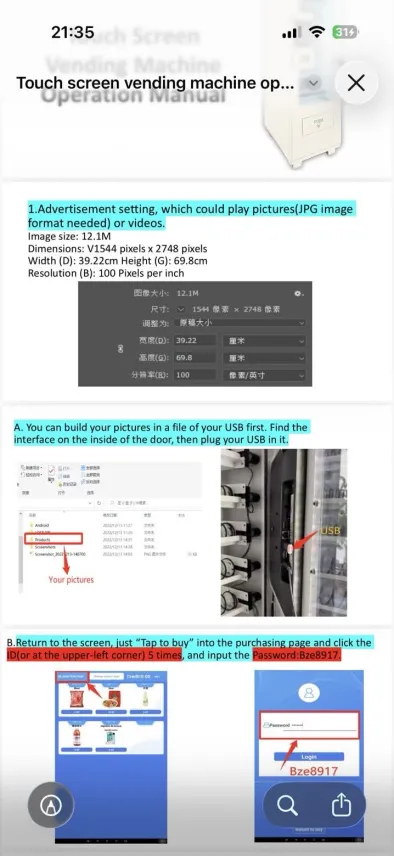
From the manual screenshot, an advertisement image can use these values:
| Item | Visible value |
|---|---|
| Format | JPG image format or video |
| Dimensions | 544 × 2748 px |
| Screen size | 39.22 cm × 69.8 cm |
| Resolution | 100 pixels per inch |
| Example size | 12.1 MB |
Prepare the USB folder
- Prepare the pictures on your PC.
- Create a clear folder on the USB drive, for example
Products,PicturesorAds. - Plug the USB drive into the USB port inside the machine door.
Administrator access from the purchase screen
From the purchase screen:
- touch Tap to buy or anywhere on the purchasing page;
- touch the ID in the upper-left corner 5 times;
- enter the password shown in the manual:
Bze8917; - confirm with Login.