Manual Installation
USB and files
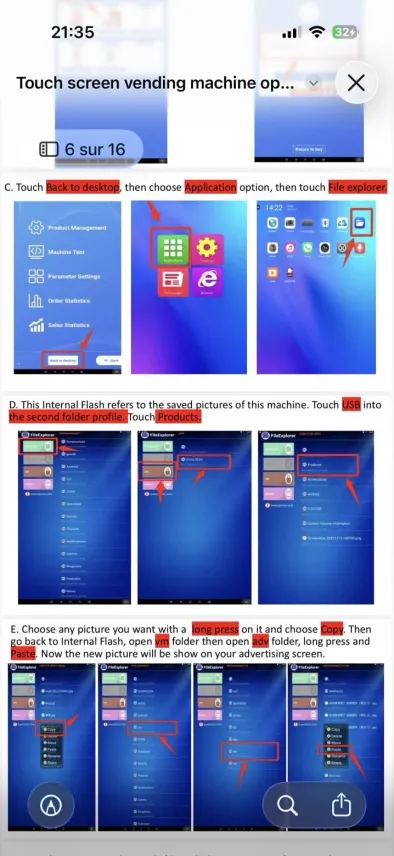
Copy pictures from USB storage to Internal Flash.
Return to desktop
- From the administrator panel, touch Back to desktop.
- Open Application.
- Start File Explorer.
Locate the USB drive
In File Explorer:
- Internal Flash is the machine internal storage;
- USB appears in the second profile or folder;
- open Products or the folder containing your pictures.
Copy an advertising picture
- Long press the picture.
- Choose Copy.
- Go back to Internal Flash.
- Open
vm, thenadv. - Long press in the folder and choose Paste.
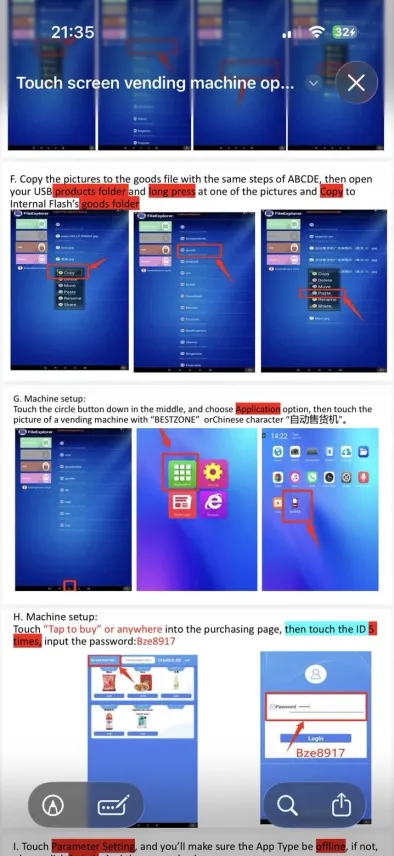
Copy product pictures
- Open the
Productsfolder on the USB drive. - Copy the pictures.
- Paste them into Internal Flash →
goods.